- quick key
- ctrl + R: reverse 的快速搜尋之前下過的指令
history
- 可以列出最近下過的指令, 並用
!number
執行第 number 的指令
2017年12月9日 星期六

2017年12月8日 星期五
[Android] Nougut with Raspberry Pi
- sync code
- platform: android
- Q & A:
- sync size 太大 (不確定整個 size 是多少? 看起來應該不少於 45GB)
- 可以用以下指令抓取
repo sync -c --no-tags --no-clone-bundle
- 其中最主要是 -c: 只抓目前 branch
- 更多細節可以查看
repo help sync
- Ref:
- Reference:
[Android] sync code
- version control tools
- repo
- 簡介: 主要靠 Manifest 來記錄 remote, remote url, 各 project revision等資訊. Manifest 為一個 XML格式的檔案, 記錄各 project git 資訊, 預設的檔案名稱是 default.xml
- 用法:
repo init -u mainfestURL -b branch
- 通常第一步即透過 mainfest 的 URL得到想要的 manifest資訊, 會產生一個隱藏資料夾 .repo, 通常也可以製作 snapshot.xml
repo sync
- 通常緊接於 repo init 或是透過 snapshot init後, 需要由 repo 通知各 project 進行 git checkout的動作
repo upload
- 較少用到, Manifest 裡 remote 的欄位有設 review url的話, 便會進行 git push 的動作.
- git
git checkout -b localBranchName remoteBranchName
git commit
git commit --amend
可修改最後一次 commit的內容git push
將 change 上到 remotegit pull
sync .git 的資訊, 更新 metadata, 檔案等尚未進行 sync- 與 repo 可以整合應用, e.g.:
repo forall -c 'git checkout branch'
git config
設定 git的 configuration, 通常用在設定 user name跟 e-mailgit add fileName
git reset
僅更改 file status
git checkout
會重新抓檔案
git update-index --chmod=-x fileName
git diff (--cached)
git status
非常常用, 看各個檔案目前是在什麼 status: tracked, untracked,...- Sync Android code
- Setup repo
mkdir ~/bin
PATH=~/bin:$PATH
curl https://storage.googleapis.com/git-repo-downloads/repo > ~/bin/repo
chmod a+x ~/bin/repo
- Setup git
git config --global user.name "Your Name"
git config --global user.email "you@example.com"
- P.S.: 若是在 synology nas上操作的話, 可能遇到
error: could not lock config file /var/services/homes/yourName/.gitconfig: No such file or directory
的問題 - 在 Control Panel->User Account->Advanced Option中啟用家目錄即可

repo init -u https://android.googlesource.com/platform/manifest
repo sync -j8
- Reference: Downloading the Source

[Android] architecture
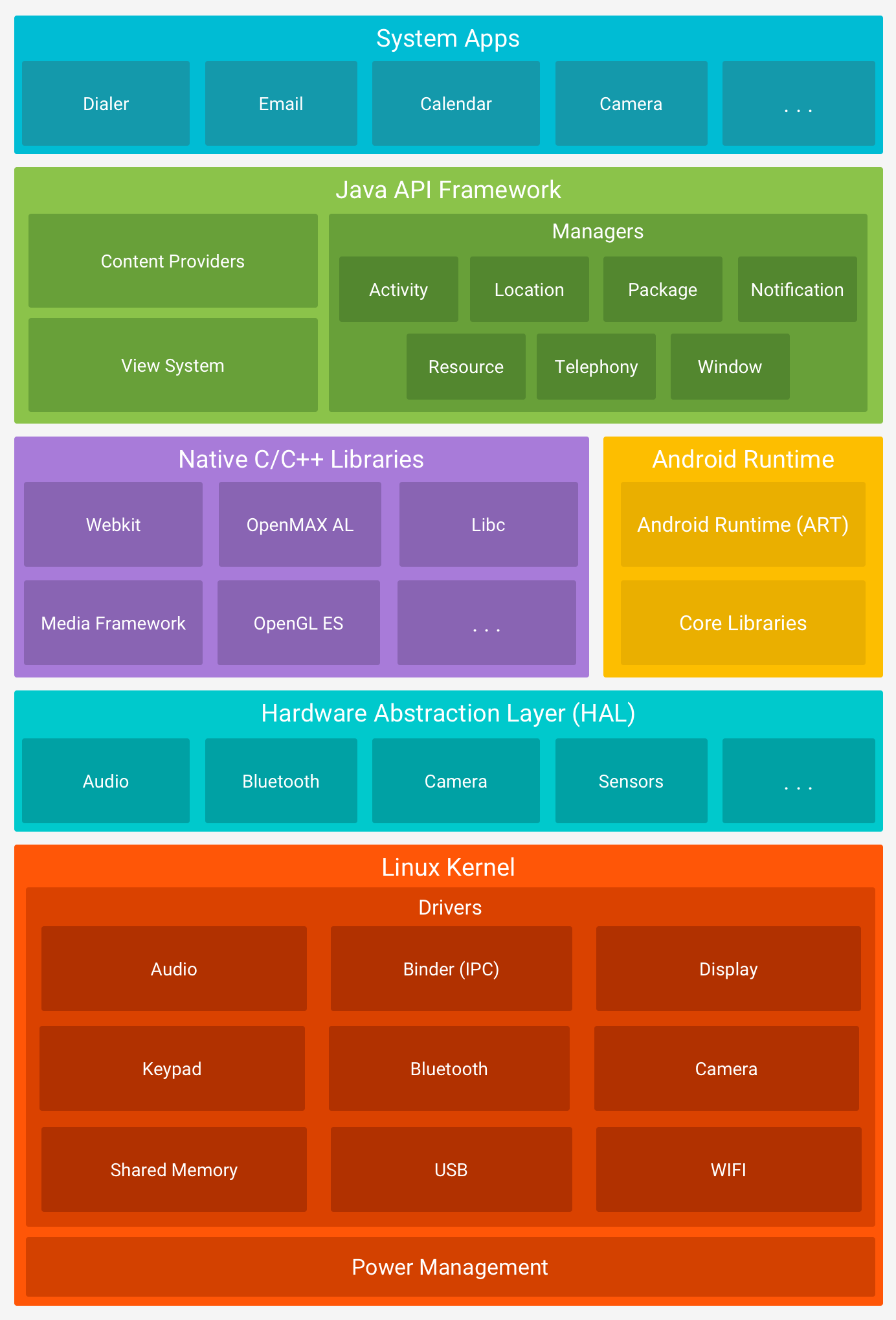
- Linux kernel (GPL license) (aosp中並沒有包含 kernel source code)
- Hardware Abstract Layer (HAL) (Android license: Apache license)
- user space C/C++ library layer
- defines interface that Android requires hardware drivers to implement
- separates Android platform logic from hardware interface
- Native C/C++ libraries (library and runtime): OpenMAX AL, libc, OpenGL ES, Media Framework, WebKit
- Java API frameworks (application frameworks): View System, Content Provider, Activity, ...
- System Apps
- Tools
- repo
- cutilies
- make, ...
2017年11月29日 星期三
[Profiling] DS-5
- What is ARM DS-5?
- Install
- .config: 建立 kernel config, timer, interrupt, tracers
- *.ko:
- gator:
- gatord:
- download ARM DS-5
- Reference:
[Development] using GNU development tools
- SOP
Configure
Build
- universal binary:
- build flag: e.g.
--arch ppc --arch i386
Install
[Node.js] framework: Express
- library
- $npm install express -g
- binary generator
- $npm install express-generator -g
- Usage
- generate template app
- $express --view=ejs sampleExpress
- install dependencies:
- $cd sampleExpress && npm install
- run the app
- $DEBUG=sampleExpress:* npm start
- validate
- jshint
- generate template app
2017年11月25日 星期六
[Kernel] Linux kernel debug
- 技巧
- 用 printk dump messages to console
- 簡單好用, 行為類似 printf, 不過這會改變 kernel行為 (例如: 執行速度變慢, 使得 race condition 行為不一致)
- 可同時更改 ring buffer size (更改 kernel boot parameter: log_buf_len), 避免 log的訊息被裁斷
- 更改 log level, 預設為 KERN_WARNING, e.g. 開啟所有 log: , 並刪除 boot parameters: quiet, splash (runtime 查看 boot parameters:
- 用 gdb
- disassemble function codes
-
gdb vmlinux
(gdb) dissemble functionName - locate core dump:
gdb crashed_function_obj, e.g. gdb sd.o(gdb) list *(backtrace_func_shown+offset), e.g. list *(sd_remove+0x20- 用 objdump
objdump -SdCg sample.o- ToDo: add2line 指令介紹, ELF 格式介紹, study Kernel Debugging
- Reference
cat /proc/cmdline)echo 7 > /proc/sys/kernel/printk2017年8月27日 星期日
[Mac] Code sign for gdb
- 在 Mac上以 MacPort 安裝 gdb 後, 會顯示
gdb has the following notes: You will need to codesign /opt/local/bin/ggdb See https://sourceware.org/gdb/wiki/BuildingOnDarwin#Giving_gdb_permission_to_control_other_processes for more information.- 請按照網頁所列方法為 gdb 做 code sign. 否則在 gdb run的時候會顯示以下 error message:
Unable to find Mach task port for process-id 72241: (os/kern) failure (0x5).
 (please check gdb is codesigned - see taskgated(8))
訂閱:
文章 (Atom)