- 在 trace Android media player時, 常看到 function有些有加 _l suffix的, 有的沒有. e.g. prepare, prepare_l
- 主要的差異在於是否有用 Mutex lock住
- 但此時又看到神奇的 code
- /frameworks/av/media/libmediaplayerservice/nuplayer/NuPlayerDriver.cpp
-
status_t NuPlayerDriver::prepare() { ALOGV("prepare(%p)", this); Mutex::Autolock autoLock(mLock); return prepare_l(); } - /frameworks/av/media/libmediaplayerservice/nuplayer/NuPlayerDriver.cpp 因此會發出疑問, 這個 autoLock 是做什麼的? 定義卻沒有使用?
- 簡單說, 就是利用 constructor跟 deconstructor 來呼叫 mutex lock 跟 mutex unlock
- 而此處的 prepare_l 有 l結尾的應該就是指 lock後執行的程式碼
2017年12月28日 星期四
[Android] Autolock

2017年12月27日 星期三
[C++] Coding convention - prefix k and What
- trace Android code時, 常會看到如下的 code
enum { kWhatSetDataSource = '=DaS', kWhatPrepare = 'prep', kWhatSetVideoSurface = '=VSu', kWhatSetAudioSink = '=AuS', kWhatMoreDataQueued = 'more', kWhatConfigPlayback = 'cfPB', ...- 這個 k代表什麼意思呢? => konstant, 因為 c的 prefix 已經被 char 用掉了, 用了 Germany的 konstant, 至於全大寫與 Hungarian notation 就不在這戰了
- 至於 What, 則猜測這些 enum 主要是用來在 message中傳遞, 對應 message.what 的 int值, 所以在 handler中常會看到自行定義的 enum 用 kWhat當 prefix
- 節錄 Android doc Message.what
-
what
int what
User-defined message code so that the recipient can identify what this message is about.
Each Handler has its own name-space for message codes,
so you do not need to worry about yours conflicting with other handlers.
[Android] DISALLOW_EVIL_CONSTRUCTORS
- 簡單的 macro, 用來避免未實作的 copy constructor 跟 assignment constructor 被 compiler實作
- Code
#define DISALLOW_EVIL_CONSTRUCTORS(name) \

name(const name &); \

name &operator=(const name &) /* NOLINT */
- Sample: ABuffer.h
struct ABuffer : public RefBase { explicit ABuffer(size_t capacity); ABuffer(void *data, size_t capacity); ... private: DISALLOW_EVIL_CONSTRUCTORS(ABuffer);- Reference:
2017年12月8日 星期五
[Android] Nougut with Raspberry Pi
- sync code
- platform: android
- Q & A:
- sync size 太大 (不確定整個 size 是多少? 看起來應該不少於 45GB)
- 可以用以下指令抓取
repo sync -c --no-tags --no-clone-bundle
- 其中最主要是 -c: 只抓目前 branch
- 更多細節可以查看
repo help sync
- Ref:
- Reference:
[Android] sync code
- version control tools
- repo
- 簡介: 主要靠 Manifest 來記錄 remote, remote url, 各 project revision等資訊. Manifest 為一個 XML格式的檔案, 記錄各 project git 資訊, 預設的檔案名稱是 default.xml
- 用法:
repo init -u mainfestURL -b branch
- 通常第一步即透過 mainfest 的 URL得到想要的 manifest資訊, 會產生一個隱藏資料夾 .repo, 通常也可以製作 snapshot.xml
repo sync
- 通常緊接於 repo init 或是透過 snapshot init後, 需要由 repo 通知各 project 進行 git checkout的動作
repo upload
- 較少用到, Manifest 裡 remote 的欄位有設 review url的話, 便會進行 git push 的動作.
- git
git checkout -b localBranchName remoteBranchName
git commit
git commit --amend
可修改最後一次 commit的內容git push
將 change 上到 remotegit pull
sync .git 的資訊, 更新 metadata, 檔案等尚未進行 sync- 與 repo 可以整合應用, e.g.:
repo forall -c 'git checkout branch'
git config
設定 git的 configuration, 通常用在設定 user name跟 e-mailgit add fileName
git reset
僅更改 file status
git checkout
會重新抓檔案
git update-index --chmod=-x fileName
git diff (--cached)
git status
非常常用, 看各個檔案目前是在什麼 status: tracked, untracked,...- Sync Android code
- Setup repo
mkdir ~/bin
PATH=~/bin:$PATH
curl https://storage.googleapis.com/git-repo-downloads/repo > ~/bin/repo
chmod a+x ~/bin/repo
- Setup git
git config --global user.name "Your Name"
git config --global user.email "you@example.com"
- P.S.: 若是在 synology nas上操作的話, 可能遇到
error: could not lock config file /var/services/homes/yourName/.gitconfig: No such file or directory
的問題 - 在 Control Panel->User Account->Advanced Option中啟用家目錄即可

repo init -u https://android.googlesource.com/platform/manifest
repo sync -j8
- Reference: Downloading the Source

[Android] architecture
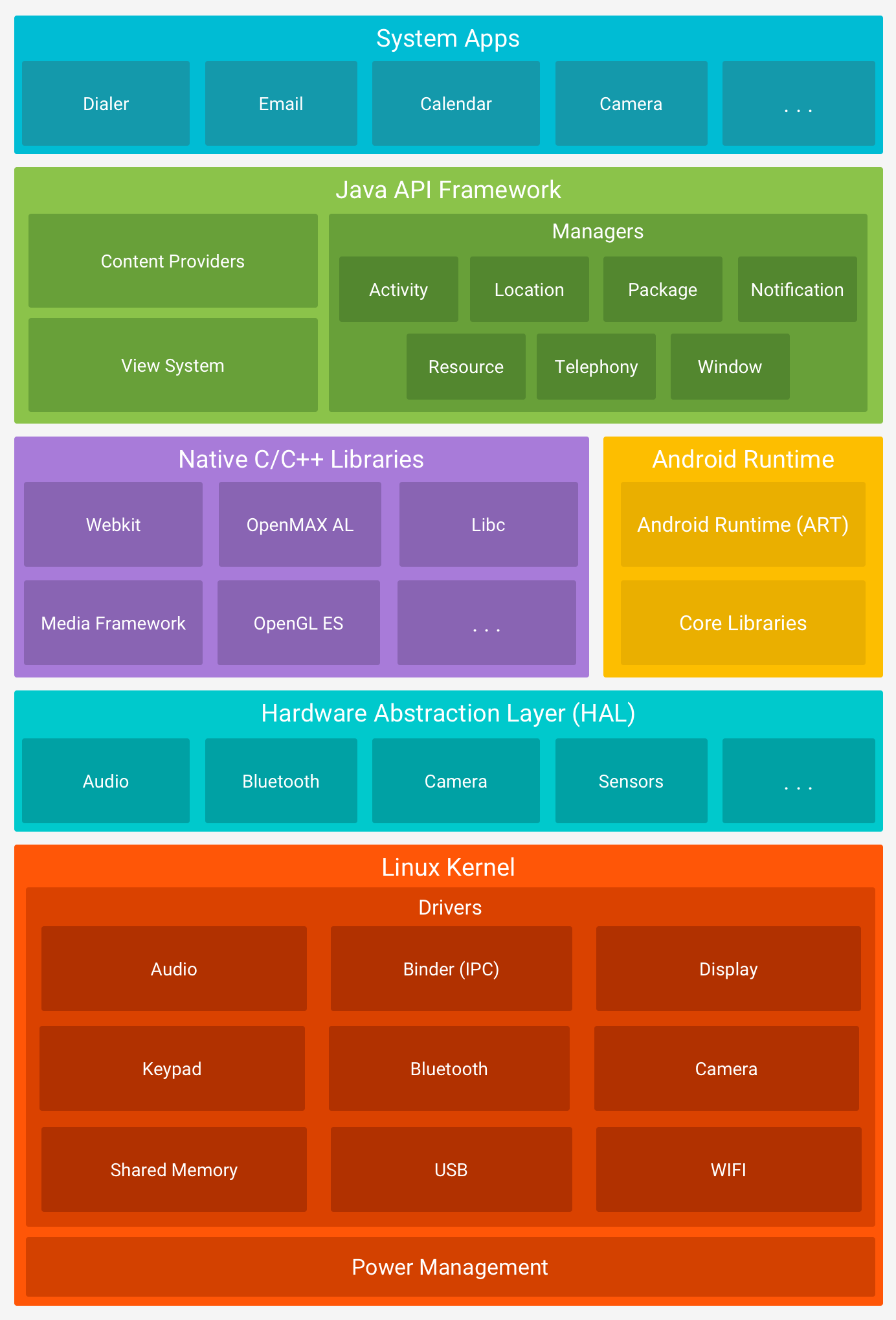
- Linux kernel (GPL license) (aosp中並沒有包含 kernel source code)
- Hardware Abstract Layer (HAL) (Android license: Apache license)
- user space C/C++ library layer
- defines interface that Android requires hardware drivers to implement
- separates Android platform logic from hardware interface
- Native C/C++ libraries (library and runtime): OpenMAX AL, libc, OpenGL ES, Media Framework, WebKit
- Java API frameworks (application frameworks): View System, Content Provider, Activity, ...
- System Apps
- Tools
- repo
- cutilies
- make, ...
2012年11月18日 星期日
[Android] Android Training Course-My First App
- 官方教學網站
- Resources
- 所有資源存在 gen/R.java中
- 可以開啟該檔,看到所有資源的 id,以供未來其他檔案使用
- 但不要手動編輯此檔 !!! Android在每次 build時都會自動重建此檔
- android:id 定義每個元件的名稱, 以供未來存取
- +代表第一次宣告該物件
- @則是在 XML檔中存取其他 resource必須加的 (string與 view等 concrete resource除外)
- Coding and Debugging
- Ctrl+Shift+O: 自動補齊缺少的 import class
- Intent
- controller of activities
- 常見功能: 開始另一個 activity(包含傳送資料給另一個 activity)
- 隨時可用 getIntent()存取目前的 intent
- Activity
- 相當於 iOS的 ViewController
- 是 Context的 subclass
- Every activity is invoked by an intent!!
- Manifest
- 必須在 manifest中定義所有的 activity
2012年11月12日 星期一

2012年10月21日 星期日
訂閱:
文章 (Atom)